Rekey research · hands-on test
Changed my password and now I can't log in: what your password manager does next
TL;DR
Your password manager is still filling the old password, and it won't tell you.
- All three managers I tested filled the old password. In a hands-on test for Rekey on 28 September 2026, I changed a password behind the backs of 1Password, Bitwarden and Proton Pass. None of them said a word when the site refused it.
- Stop filling it. Type the new password yourself, or use the site's forgot-password link if you don't know it.
- When the save prompt appears, pick Update, not New Item. On TypeRacer, 1Password defaulted to New Item and Proton Pass offered Add. Both leave a duplicate with the old password behind.
- A refused site password isn't a vault problem. Don't change your master password because of it. The full steps.
TypeRacer · 28 Sep 2026 · 3 managers
0 of 3 warned me when the site refused the password they filled
You changed an at-risk password and now the site won't let you in. Your password manager keeps filling a password the site no longer accepts, and nothing tells you why. I recreated that on my own accounts in 1Password, Bitwarden and Proton Pass to see what each one does and what you can do about it. Every result comes from a screen recording. The data is free to download.
Why won't my password work even though it's correct?
Your password stops working because there are now two passwords, and your password manager only knows the old one. You set a new password on the site. Maybe you did it on your phone or in another browser, or the extension was switched off. The manager wasn't watching, so it never saved the new one. Autofill keeps handing the site the wrong password.
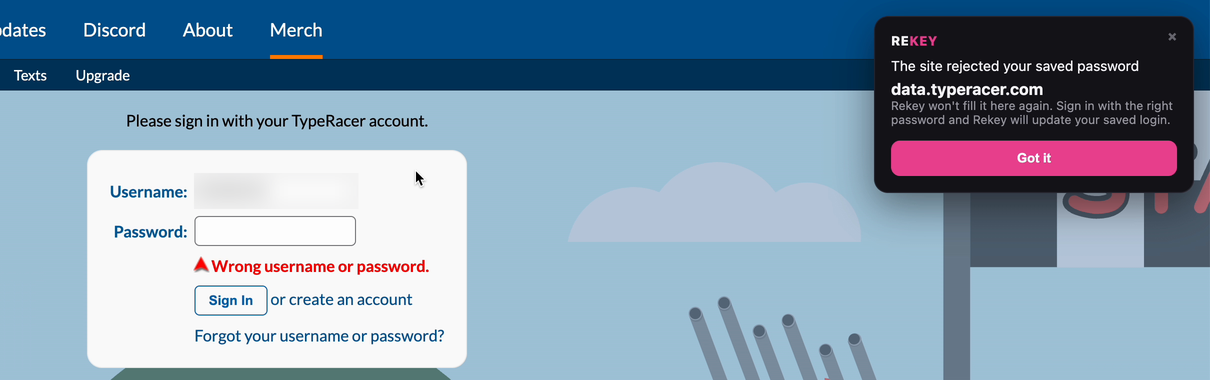
Wrong username or password.And from the password manager, nothing.
That's what I recreated. I saved a login in each manager and switched it off. Then I changed the password on the site. I turned the manager back on with the other extensions off and let it fill the password. TypeRacer was the one site where all three managers finished the test:
| Manager | Filled the old password | Warned at the error | Offered after the right password | Clicks to the error |
|---|---|---|---|---|
| 1Password | Yes | No | New Item (default) | 1 |
| Bitwarden | Yes | No | Update existing | 3 |
| Proton Pass | Yes | No | Add (a new item) | 3 |
Clicks counted from landing on the sign-in page with the vault unlocked. Proton Pass also finished the test on a second site (below). The other runs were incomplete and are marked that way in the data file.
1Password got me to the error fastest. Its bar at the top of the page filled the password and submitted it in one click, against three for the other two. Fast is great when the password is right. When it's wrong, you hit the wall sooner.
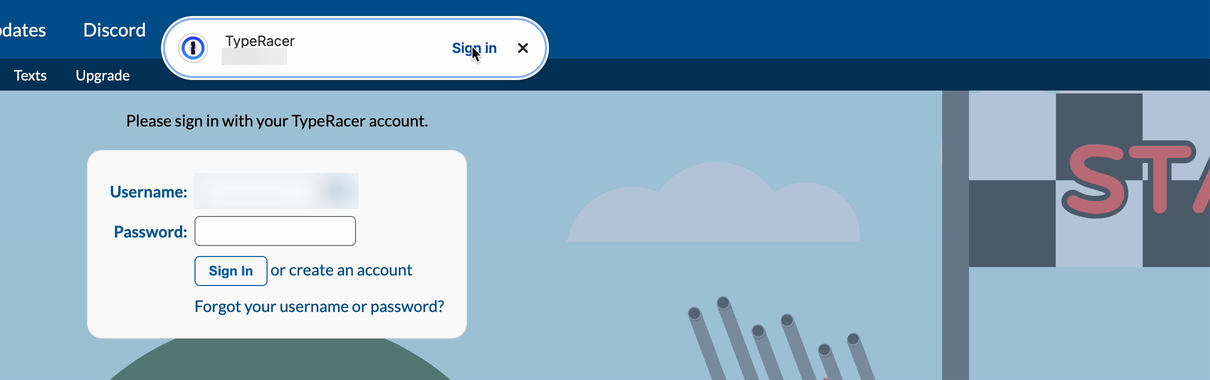
At the error: what each manager showed
Here's the moment the site refused the old password. Find the red error under the password box, then look for anything from the manager. Tap any screenshot to see it full size.
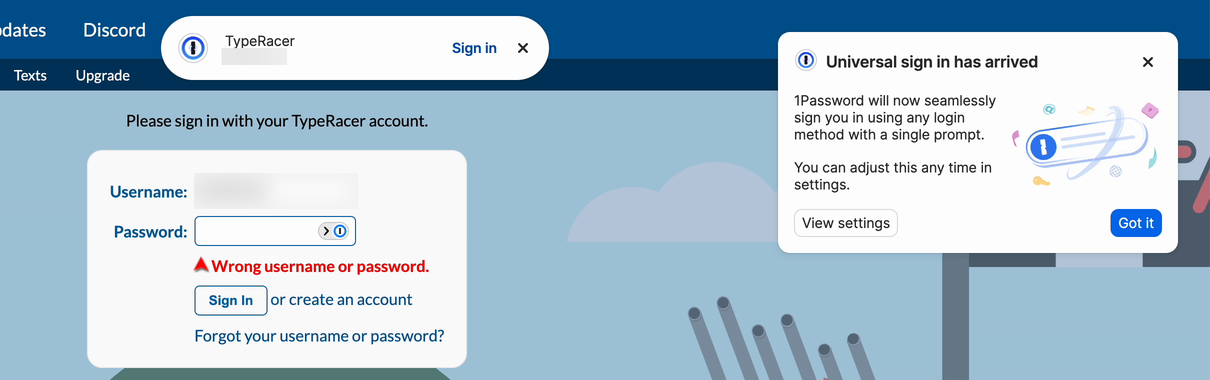
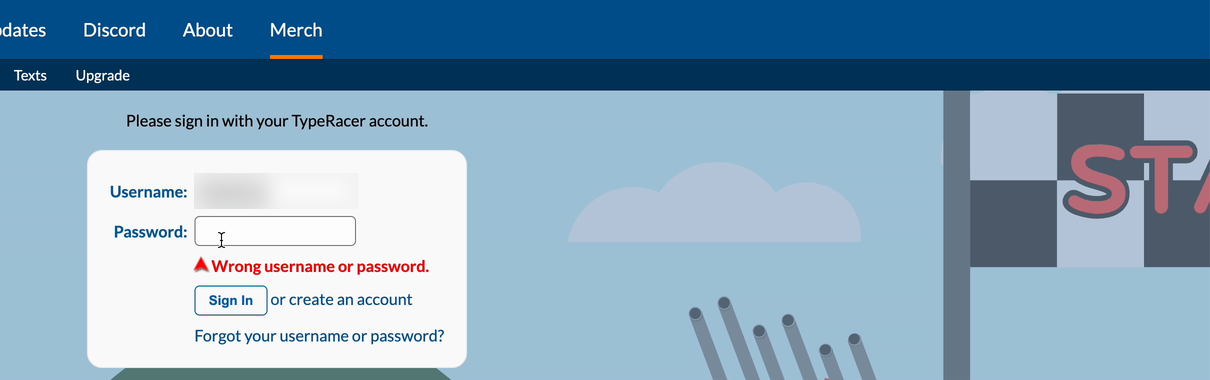
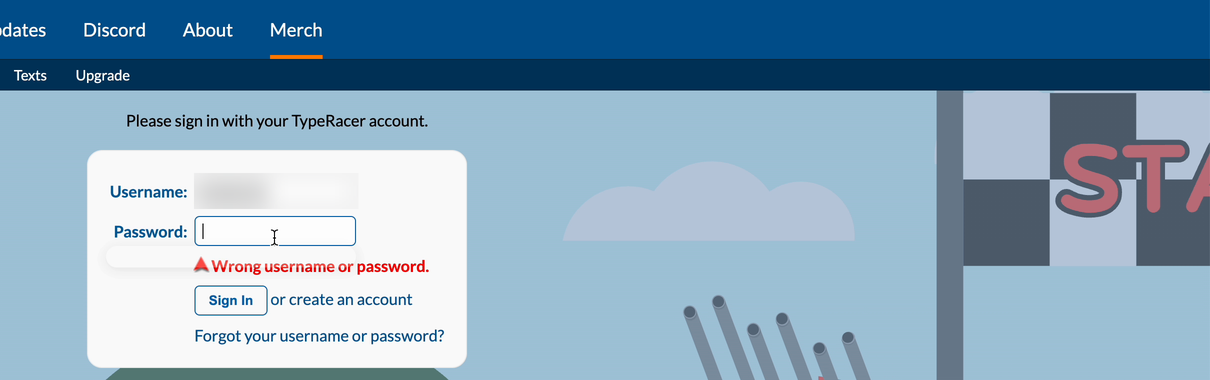
The silence is the real problem. You can't tell whether you mistyped, the change failed or someone took over the account. Your manager knows the password it filled was refused, and it says nothing.
What it could look like instead
I build Rekey, so it's not in the results. Its first run that evening showed the wrong card, so I fixed it and ran the test again at 9:39 PM. This time it flagged the refused password and stopped filling it, then updated the same login with an Undo. Treat this one clean run as a picture of the fix, not a comparison.
What does my password manager do after I sign in?
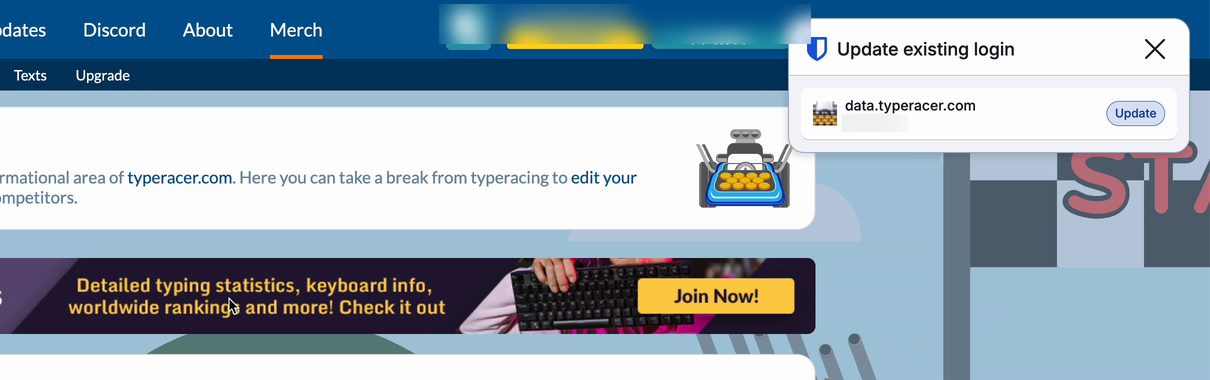
Your password manager offers to save the right password once you sign in, but on TypeRacer only Bitwarden offered to update the login it already had. What they offer decides whether you end up with one correct login or two that clash.
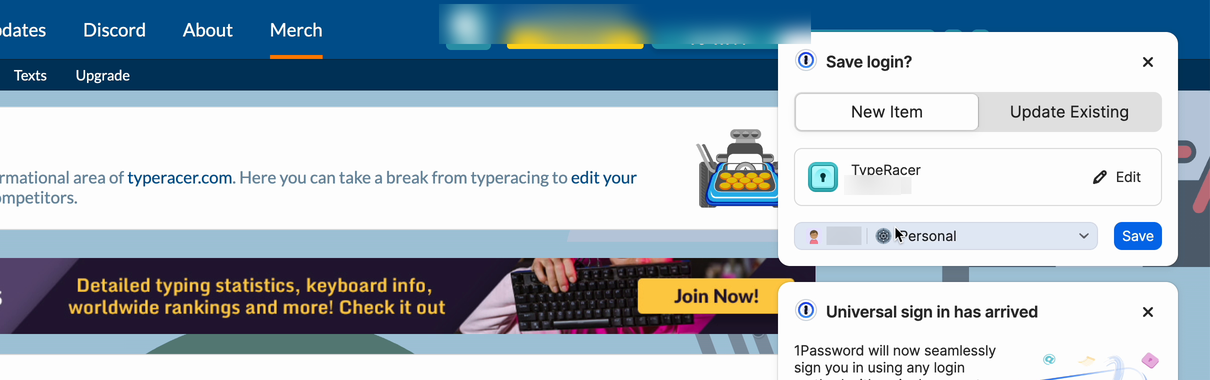
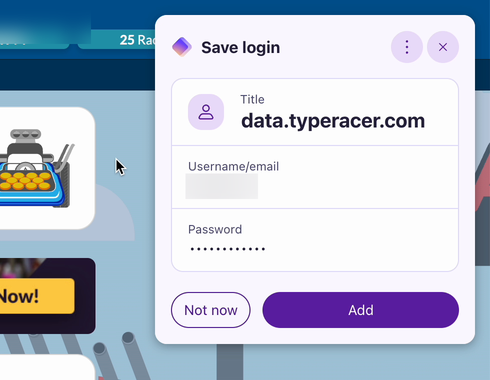
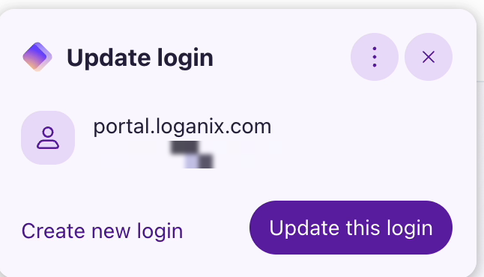
So Proton Pass did the right thing on one site and not the other. Loganix asks for your email first and the password on a second screen; TypeRacer has both on one page. Why it behaved differently, I can't say from one run each.
Which password manager handles a changed password best?
Bitwarden handled the changed password best on TypeRacer. It was just as silent as the others at the error. But it was the only one that offered to fix the login it already had, and one click left me with one correct login. That's one run per manager on one site. Read it as what happened on my account, not a ranking for every site.
Getting back in took the same effort everywhere: type the new password, sign in, save. That's 3 steps in all three managers. None of them used the failed attempt to help.
What should I do right after a password change fails?
After a failed password change, stop the old password from going in again. Get in with the right one, then make the vault match the site. Tick each step as you go.
- Stop filling the saved password. Once the site refuses it, it'll keep refusing it. In my test the site refused the old password every time it was submitted.
- Check the item's history and the generator history.Ours Item history may still hold a password the vault once had. If your manager generated the new one, its generator history may have it even though it was never saved. More on history.
- Sign in with the right password, or reset it. Type it by hand if you know it. If you don't, use the site's forgot-password link instead of digging through the vault.
- When the save prompt appears, choose Update. Not New Item, not Add. You want one login with the right password, not two.
- Delete any duplicate straight away. Otherwise the copy with the old password gets offered next time and fails again.
- Leave your master password alone. A site refusing a saved password doesn't mean your vault is at risk. While you're in, check your recovery setup instead.
- Prove it's fixed.Ours Open a private window and sign in with the login your manager fills. If that works, the vault and the site match and you're done. My guide to changing an at-risk password without getting locked out covers how to avoid this next time.
Did this start with an email? Check the alert inside your password manager, not through a link in the email.
Can password history get my working password back?
Password history can only give back a password your vault once had. That makes it the fix for one situation and useless for the other.
- Your vault had the working password, then you saved over it. History is your friend here. 1Password "saves previous versions of items every time you make changes" (1Password, item history). Bitwarden "stores the last five saved passwords for each login item" (Bitwarden, password history).
- The site has a password your vault never saw. That's the case my test recreated, and item history can't help with it. The one exception: if your manager generated that password, check its generator history. Bitwarden says its list helps "when you generate a password but forget to save it" (Bitwarden), though it's kept per app and cleared when you log out. And Dashlane's lists generated passwords "including passwords that have never been saved to a login" (Dashlane). If it isn't there either, you're no longer recovering a password. You're proving to the site that you own the account.
How much history you get varies a lot, from 5 passwords in Bitwarden to 100 changes in LastPass. The table below has all eight.
How do I recover my master password?
Master password recovery only works with something that was in place before you got locked out: a recovery code, key or phrase, a device that's still signed in, biometrics, or a trusted contact or admin. LastPass adds one more: your previous master password, if you changed it in the last 30 days. That's a different problem from a refused site password. It locks the vault itself, and it's the one people fear most. I read the help pages of eight password managers on 29 September 2026 and re-checked every quote on 14 October 2026.
Master password suddenly not working?Ours Check the simple things before you assume it's lost: Caps Lock, your keyboard language, and whether a device that's still signed in will open the vault.
| Manager | Password history | Waits or blocks | Plan limits | Nothing set up? |
|---|---|---|---|---|
| 1Password | Every edit | 1 h, then 24 h block | Teams: via admin | Start over |
| Bitwarden | Last 5 | You set it | Emergency access | New account |
| Proton Pass | 2 weeks | Not stated | Not stated | Keep account, lose data |
| Dashlane | Web and Android | Not stated | Admin recovery | Reset erases all |
| Keeper | Record history | Not stated | Not stated | New account |
| NordPass | Last 10 | Not stated | Not stated | Items deleted |
| LastPass | Last 100 changes | Revert within 30 days | Business: separate | Empty vault |
| Enpass | Per item | None | Admin recovery | Start over |
"Not stated" means the help page I read doesn't say, not that there's no limit. Tap a manager below for the ways back in, the exact wording and the sources. Also in the recovery data file.
1Password
Ways back in: a recovery code; a family organizer or team administrator; Touch ID, Apple Watch or another signed-in device to copy your data to a new account. Waits: "wait at least one hour" after creating a recovery code, and "If you attempt a recovery after a recent sign in, the recovery attempt will be blocked and your code will be unusable for 24 hours." Plans: recovery codes on 1Password.com are for individual and family accounts; team and business accounts go through an administrator. If nothing works: "You'll need to start over."
Sources: item history · forgot account password · recovery codes
Bitwarden
Ways back in: master password hint by email; emergency access (a trusted contact); administrator account recovery in organizations; logging in with a known device; a PRF passkey; PIN or biometrics on another device to copy data out. Waits: emergency access is approved by you, or after a wait time you set. Plans: emergency access "is available to premium users, including members of paid organizations". If nothing works: Bitwarden "has no way to access, retrieve, or reset your master password". You create a new account.
Sources: history · forgot master password · emergency access · plans
Proton Pass
History: in the browser extension, "only saved for two weeks, after which it is deleted." Ways back in: a 12-word recovery phrase (resets the password and recovers data); a signed-in reset; reset by email or phone (password only); a recovery file, device backup or trusted contacts (data only). If nothing works: a reset without a data recovery method loses "everything that was on your account before the password reset".
Sources: password history · recovery methods
Dashlane
History: previous passwords for a login in the web and Android apps, once you've changed it at least once; "you can't delete any of the entries". Ways back in: a recovery key (a 28-character code); biometric recovery on a phone, or a fingerprint reset in the macOS app; admin-assisted recovery on professional plans. Each has to be turned on before you're locked out. If nothing works: "Without a recovery option, you might need to reset your account if you forget your Master Password. A reset erases all your data." Dashlane updated this page on 14 October 2026.
Sources: password history · recovery options
Keeper
History: view and restore earlier versions of a record (Record History). Ways back in: a 24-word recovery phrase. Business accounts may sign in with single sign-on instead. If nothing works: without the master password and recovery phrase, "Keeper support cannot help you". Consumer and family users create a new account.
Sources: web vault · reset your master password
NordPass
History: "up to 10 of the latest passwords" per item, with restore; not offline or for shared items. Ways back in: a 24-symbol recovery code; without it, reset the recovery code with biometrics in an app where you're still signed in. If nothing works: resetting the account "will delete all of your NordPass items."
Sources: password history · forgot master password · no recovery code · reset account
LastPass
History: username, password and note history; the password history shows "the last 100 changes". Ways back in: automatic recovery on a device and browser you used before; biometric recovery in the mobile app; a one-time password made in advance; a master password hint; going back to your previous master password, but only if you changed it in the last 30 days. Plans: Business and Teams accounts have their own recovery rules. If nothing works: reset the account to an empty state, or create a new one.
Sources: password history · recover master password
Enpass
History: per item, with when it changed; you can keep or remove it. Ways back in: none for the personal version. Enpass Business: recovery from your admin. If nothing works: "Enpass should be reset so you can start over as a new user." Your own backups are the only copy.
Sources: password history · change master password
- BeforeAlmost every way back in has to exist before you're locked out. LastPass's 30-day revert to your previous master password is the main exception.
- 7 of 8start you over with a new or empty vault if nothing was set up. Proton keeps the account but not the data from before the reset.
- 24 h1Password's block on a recovery code tried after a recent sign in, on top of an hour's wait after you create one.
- PremiumBitwarden's emergency access needs a paid plan. On the free plan it isn't a way back in.
When nobody can help you
If you lose access to a zero-knowledge vault, support can't recover it for you. The company never holds a key to your data, which is why you picked it. So the real question is whether your recovery code or key is stored somewhere outside the vault it unlocks.
One thing that isn't a way back in: 1Password's Secret Key. 1Password says it "is not a backup code. It doesn't let you sign in if you forget your 1Password account password" (1Password, Secret Key). Keep it, and your Emergency Kit, somewhere outside the vault too.
What does AI search get wrong about recovery?
AI search gets recovery wrong in ways that can lock you out. On 5 September 2026 I asked ChatGPT, Google AI Mode and Perplexity four recovery questions, 12 answers in all. 5 of them had at least one of these mistakes. I reopened every answer on 14 October 2026.
- "Change your password manager master password" Perplexity told someone with a breached site password to change their master password. A leaked site password doesn't touch the vault. Changing your master password adds a new risk: forget it with no recovery set up and the vault is gone. Saved answer.
- Emergency access, no price tag Three answers recommended Bitwarden's emergency access as a way back in without saying it's a Premium feature. Google AI Mode even called Bitwarden the free option in the same answer. Perplexity · ChatGPT · Google AI Mode.
- A "Master Password Reset" that isn't one Google AI Mode listed Bitwarden's recovery code as a "Master Password Reset". To use that code you enter your email, master password and the code, and it turns off two-step login (Bitwarden). Saved answer.
- A 25-word phrase that's really 12 Google AI Mode said Proton Pass uses a 25-word recovery phrase. Proton's is 12 words (Proton). Saved answer.
Key takeaways
- 3 of 3managers filled the old password after I changed it behind their backs.
- 0 of 3said anything when the site refused it. Stop filling it yourself.
- 2 of 3offered a second login on TypeRacer. Pick Update, then delete any duplicate.
- 3 stepsto get back in, in all three. None used the failed attempt to help.
- Historyonly returns what your vault saw. Check generator history if the manager made the password.
- Set it upbefore you need it. Almost every way back into a locked vault has to exist in advance.
How this was tested
- Who and where: me, alone, in Chrome on macOS, on 28 September 2026. Three real accounts of mine: TypeRacer (username and password on one page), and Spotify and Loganix (email first, then the password on a second screen).
- Managers: 1Password (a trial account with full access), Bitwarden and Proton Pass, each as its Chrome extension, with the other two switched off. Chrome's own password manager was still on in some runs; where it filled the field, the run is marked not valid. I didn't record extension versions.
- Method: save the current login in the manager; switch the manager off; change the password on the site; switch the manager back on; let it fill; press sign in; record what the manager shows; type the right password; record what it offers.
- What counts: 3 managers on 3 sites is 9 runs. A run is complete only when the manager filled the old password and the site visibly refused it. 4 were complete: all three managers on TypeRacer, and Proton Pass on Loganix. The other 5 had the password typed by hand, a locked vault, or Chrome's own password manager filling the field. They're in the data file, marked partial or not valid, and aren't in the tables above.
- Not measured: I didn't open password history on screen in any run, so this page makes no claim about what each manager's history showed. The history section comes from the vendors' help pages.
- Recovery comparison: the help pages of 1Password, Bitwarden, Proton Pass, Dashlane, Keeper, NordPass, LastPass and Enpass, read in Chrome on 29 September 2026 and every quote re-checked on 14 October 2026. Nothing in that part was tested hands-on.
- AI answers: four questions in ChatGPT, Google AI Mode and Perplexity on 5 September 2026, every saved answer reopened on 14 October 2026.
- Evidence: every run was screen-recorded. Screenshots and clips are cropped to the page, with names and emails blurred. The full recordings are kept privately.
- Limits: one tester, three sites, one day. This shows what happened on my accounts, not a rate for every site. Rekey is mine. I ran it five times that evening while fixing it; the clean 9:39 PM run is the one shown, and it isn't counted anywhere.
Free to reuse under CC BY 4.0 with a link to this page.
Corrections: if a vendor ships a fix or you get a different result, open an issue on Rekey's public GitHub repo. I'll re-test and date the change here.
Rekey is a browser extension, in development. Join the early-access list and we will email you once, at launch.
Get early access- Finds every exposed login by checking your saved passwords against Have I Been Pwned
- Opens each site for you, with a strong new password ready to paste
- Keeps your previous password one click away while a change isn't confirmed yet, with an undo if the update was wrong
- Open source and zero-knowledge. Passwords are encrypted on your device, and optional sync only ever stores the encrypted copy. Read the code yourself
Free while in development. We will not sell your address or send you anything else.