Rekey research · hands-on test
Change at-risk password: which managers tell you why it was flagged, and on which account
TL;DR
Your password manager will tell you a password is at risk. It won't tell you where it leaked, and it may not tell you why.
- 0 of 3 said where the leaked password came from. I saved the same six test logins in Bitwarden, 1Password and Proton Pass on 30 September 2026. A leaked-password check can't name the site. That's by design.
- 1 of 3 said why on the login you normally open. 1Password did, and only for the weak password. Bitwarden showed the same "At-risk password" for leaked, reused and weak.
- Only Bitwarden flagged the leaked password without any setup. It needed Bitwarden's paid Premium plan. 1Password caught it after I switched on a setting that was off. Proton Pass never flagged it.
- No single manager won. Proton Pass was best on reused passwords. Bitwarden was best at catching the leak, on Premium. 1Password was the only one to say why on the login. The verdict.
- Open the security report to see why. That's where 1Password and Proton Pass explain reuse. The full results.
Alert test · 30 Sep and 1 Oct 2026 · 3 managers
0 of 3 said where the leaked password came from
You opened your password manager and a login says "Change at-risk password". It doesn't say why. You might not even recognise the account. One Bitwarden user put it this way on Reddit: "It doesn't say why... I couldn't even find this account in any of the reports." So on 30 September 2026 I saved the same six test logins in Bitwarden, 1Password and Proton Pass and recorded what each one shows.
A quick guide to the names you'll see. Each manager keeps its security report in a different place. Bitwarden calls it Reports, 1Password calls it Watchtower and Proton Pass calls it Pass Monitor. I checked each one in its web vault, the website you sign in to, and in its browser extension.
Here's the limit first. A leaked-password check can't tell you where your password leaked. It sends only the first five characters of a scrambled copy of your password. That keeps the password private. It also means the answer can only be "this password is on a leak list". What a manager can tell you is which problem it found and on which logins. That's what I measured.
What does "at-risk password" mean?
An at-risk password is one your password manager wants you to change. The label can cover four different problems:
- The password is on a leak list. Someone else's breach exposed the same password. It doesn't mean your account was broken into.
- The site was breached after you saved the login. This one is about the account, not just the password.
- You use the same password on more than one login.
- The password is weak.
I tested three of these: leaked, reused and weak. A breached site can't be tested on purpose, because a login's save date can't be backdated.
1Password's help page keeps the first two apart. "Compromised websites" are logins "for websites where a security breach has been reported, and you haven't changed your password since the breach". "Vulnerable passwords" are "items with passwords that have been exposed in a data breach. An attacker may not know that you have used that password, but you should still change it" (1Password, Watchtower).
- Checks
- The breach date against the date you saved the password
- Names the account
- Yes
- Called
- "Compromised websites" (1Password). Breach alerts (Firefox)
- Checks
- The first 5 characters of a scrambled copy (a hash) of the password
- Names the account
- No
- Called
- "Vulnerable passwords" (1Password). "Exposed passwords" (Bitwarden)
Here's what each manager showed on the login itself. That's the screen you get when you open the login from your normal list.
| Test login | Bitwarden | 1Password | Proton Pass | Rekey 0.1.11 (mine, beta) |
|---|---|---|---|---|
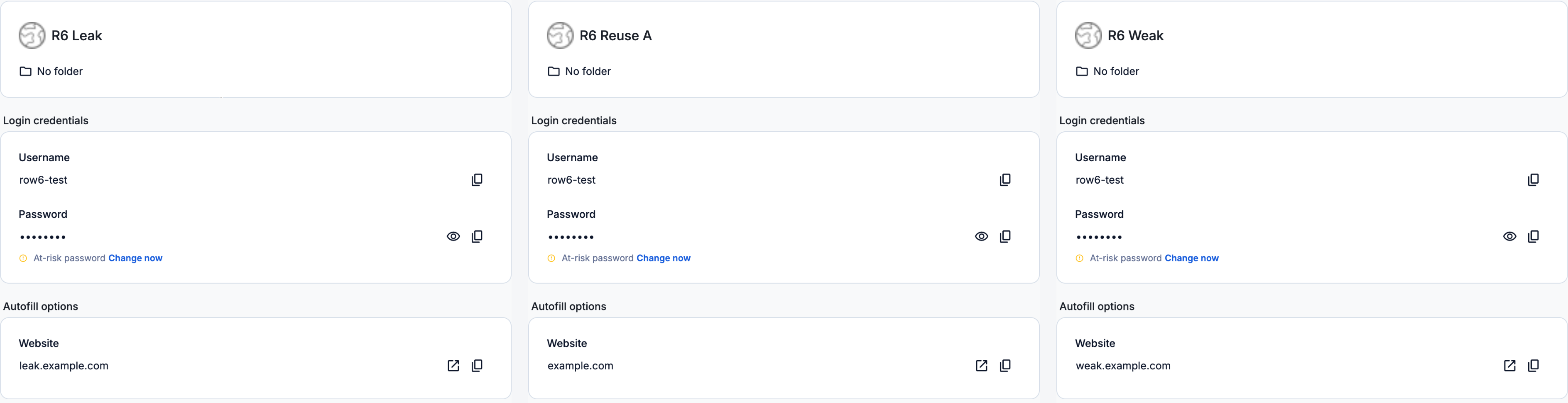
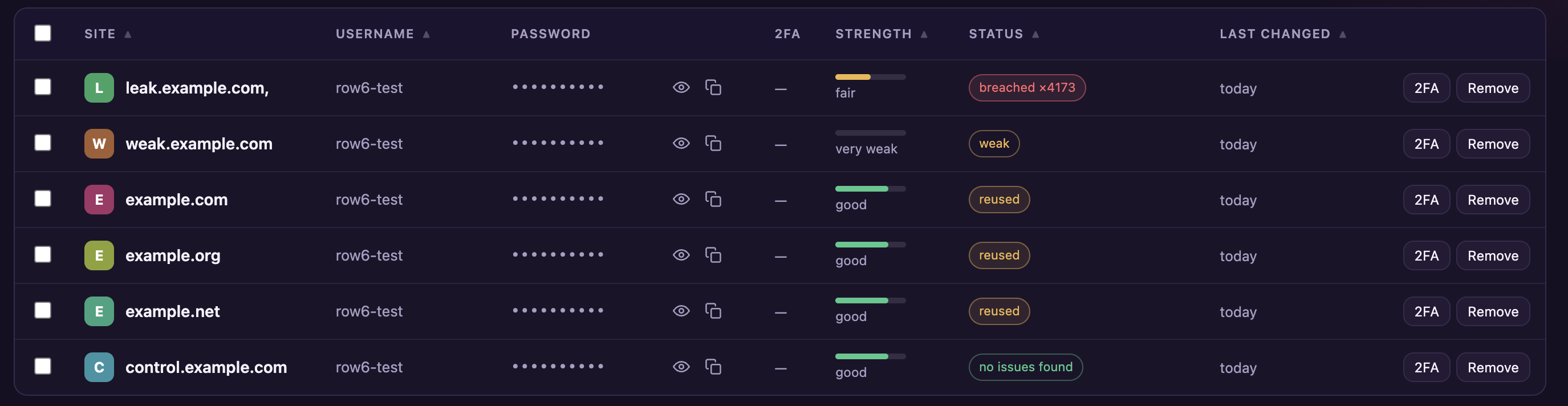
| Leaked password | At-risk password | Nothing"Vulnerable password" in the extension, once a setting is on | NothingRated "Strong" | breached ×4173 |
| Reused password | At-risk password | Nothing"Reused password" only when opened from Watchtower | NothingNames the other 2 only when opened from Pass Monitor | reused |
| Weak password | At-risk password | Weak password | VulnerableA strength rating, not a reason | weak |
| Clean password | Nothing | Nothing | Nothing | no issues found |
Rekey is the browser extension I'm building, so read its column with that in mind. Bitwarden was on Premium. 1Password was a trial account with full access. Proton Pass was on a paid family plan. How this was tested.
Why is Bitwarden saying I have an at-risk password?
Bitwarden says "at-risk password" for a leaked, reused or weak password, and the login doesn't say which. Its help page puts all three in one line: "Bitwarden prompts you to update weak, reused, or exposed passwords" (Bitwarden). The same page says the label comes from vault health reporting for Premium users. To find the cause, leave the login and open Reports. Exposed passwords, Reused passwords and Weak passwords are three separate reports. On the free plan all three were locked behind "Upgrade" when I checked on 30 September 2026. The leaked login showed no warning at all.
What is a vulnerable password?
A vulnerable password means a leaked password in 1Password and a weak one in Proton Pass. 1Password's extension marks a leaked password "Vulnerable password". Proton Pass uses "Vulnerable" as a strength rating. Its weak-password banner reads "This account is vulnerable, visit the service and change your password." So the same word means two different problems in two apps.
Why is it saying all my passwords are compromised?
It's usually saying all your passwords are compromised because one password is shared by several logins. One leak or one weak password then flags every login that uses it. In my test all three managers flagged the three logins that shared a password. Each one was on a different website.
They differ in how much they tell you about the group:
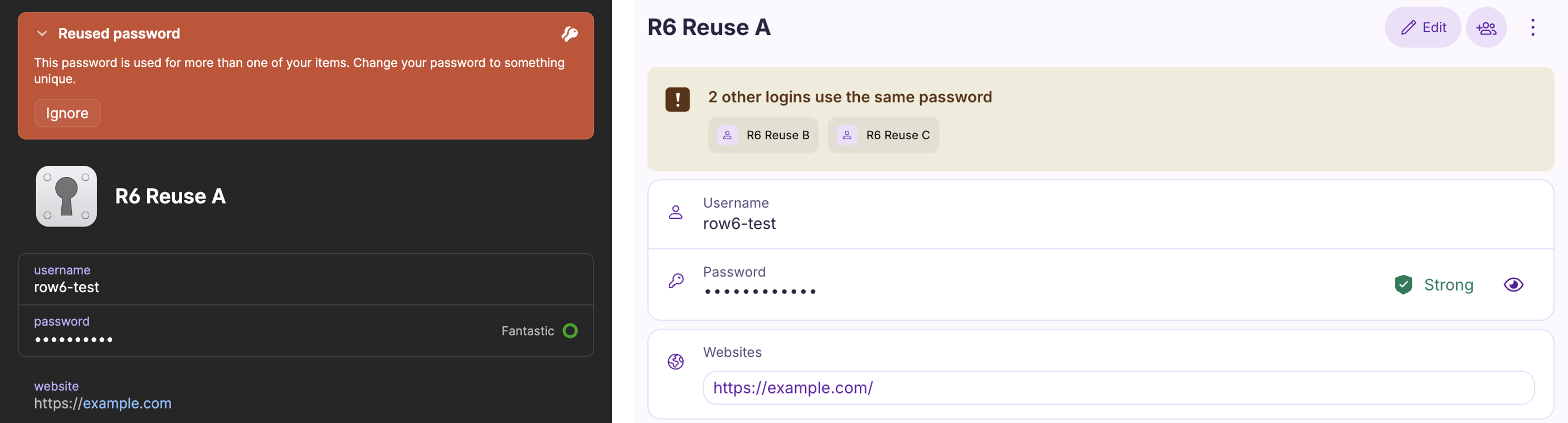
- Proton Pass names the other logins. Open one from Pass Monitor and it says "2 other logins use the same password", with links to both. Open it from the main list and it says nothing about reuse.
- 1Password groups them in Watchtower's reused list. Open a login from there and it says "Reused password". It doesn't name the others. From the main list it says nothing.
- Bitwarden lists each one in its Reused passwords report. Each says "Reused 3 times". It doesn't group them or name the others.
Ours My advice, not a test result. If a batch of logins turned at-risk on the same day, check for reuse first. Give each of those logins its own new password and the whole batch clears.
Why are lots of my logins suddenly at risk?
Lots of logins usually turn at-risk at once for one of two reasons. A password you reuse turned up in a leak, so every login sharing it changed together. Or a check that wasn't running before got switched on. In my test, switching on 1Password's leak check flagged the leaked login. Bitwarden's label only showed up once I was on Premium.
How do you find out which passwords have been compromised?
To find out which passwords have been compromised, open your password manager's security report. That's where it checks your passwords for breaches, reuse and weakness, if it checks them at all. In my test the login itself usually didn't say. Table 1 showed the login alone. Table 2 adds the security reports, the leak check and the free plan:
| What I checked | Bitwarden (Premium) | 1Password (trial) | Proton Pass (family plan) | Rekey 0.1.11 (mine, beta) |
|---|---|---|---|---|
| Problems explained on the login (out of the 3 I tested) | 0Same "At-risk password" for all three | 1Weak only | 0"Vulnerable" is a strength rating | 3A label for each |
| Problems explained in the security report (out of the 3 I tested) | 3Three separate reports | 2Reused and weak. No leak in the web app | 2Reused and weak. No leak check | 3In the list |
| Flagged the leaked password without setup | YesOn Premium: "Exposed 4,173 time(s)" | NoOnly after I switched on "Check for vulnerable passwords" | NoNo leak check | Yes"breached ×4173" |
| Said where the leak came from | No | No | No | No |
| Named the other logins sharing a password | No"Reused 3 times" on each | PartlyGrouped them in Watchtower | YesIn Pass Monitor | NoEach says "reused" |
| Free plan | LockedReports locked. No warning on the leaked login | Not tested | Not tested | Free in beta |
Bitwarden: where the reason is and how weakness shows
Where the reason is: not on the login. Open Reports, then the right one of three: Exposed passwords, Reused passwords or Weak passwords. Weakness: "Very Weak" in the Weak passwords report.
1Password: where the reason is and how weakness shows
Where the reason is: a weak password says so on the login. For a reused one, open Watchtower, then Reused passwords, then the login. Weakness: a "Weak password" banner, and the meter says "Terrible".
Proton Pass: where the reason is and how weakness shows
Where the reason is: open Pass Monitor, then Reused passwords or Weak passwords, then the login. Weakness: a "Vulnerable" strength rating on the login, and a "Weak password" banner when opened from Pass Monitor.
Rekey (mine): where the reason is and how weakness shows
Where the reason is: on the login, in the vault list. Weakness: a "weak" label and the strength "very weak".
Each manager's web vault, with the extension also checked for the leaked login. The reuse results are from 1 October 2026 (why).
Which password manager tells you why a password was flagged?
No single password manager told me why a password was flagged every time. Each one was best for a different problem, and each had a gap:
- Best for reused passwords: Proton Pass. It named the other logins sharing the password, as long as I came in through Pass Monitor. Not for leaked passwords. It never flagged mine.
- Best for catching a leaked password: Bitwarden, on Premium. It flagged the leak with no setup. Not for knowing why. It uses one label for every problem.
- Best for seeing why on the login: 1Password. Only for the weak password. Not for leaks out of the box. Its leak check was switched off.
None of the three gives you the reason without hunting for it. Rekey is my own beta. It put a separate label on each login and showed the leak count there. It didn't name the other logins sharing a password. It can't name a leak's source either.
Why didn't 1Password flag my leaked password?
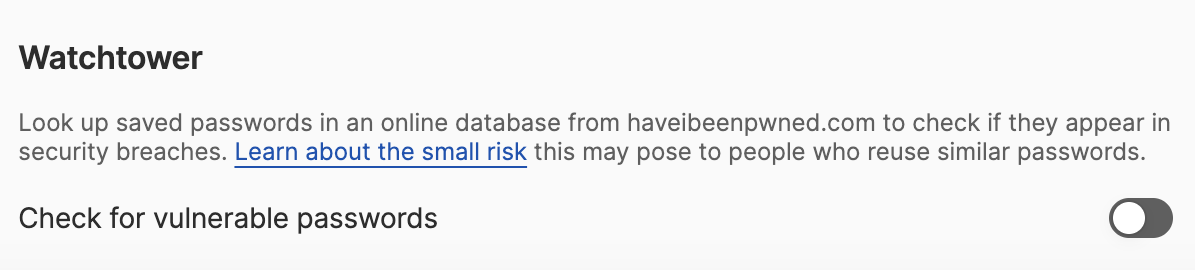
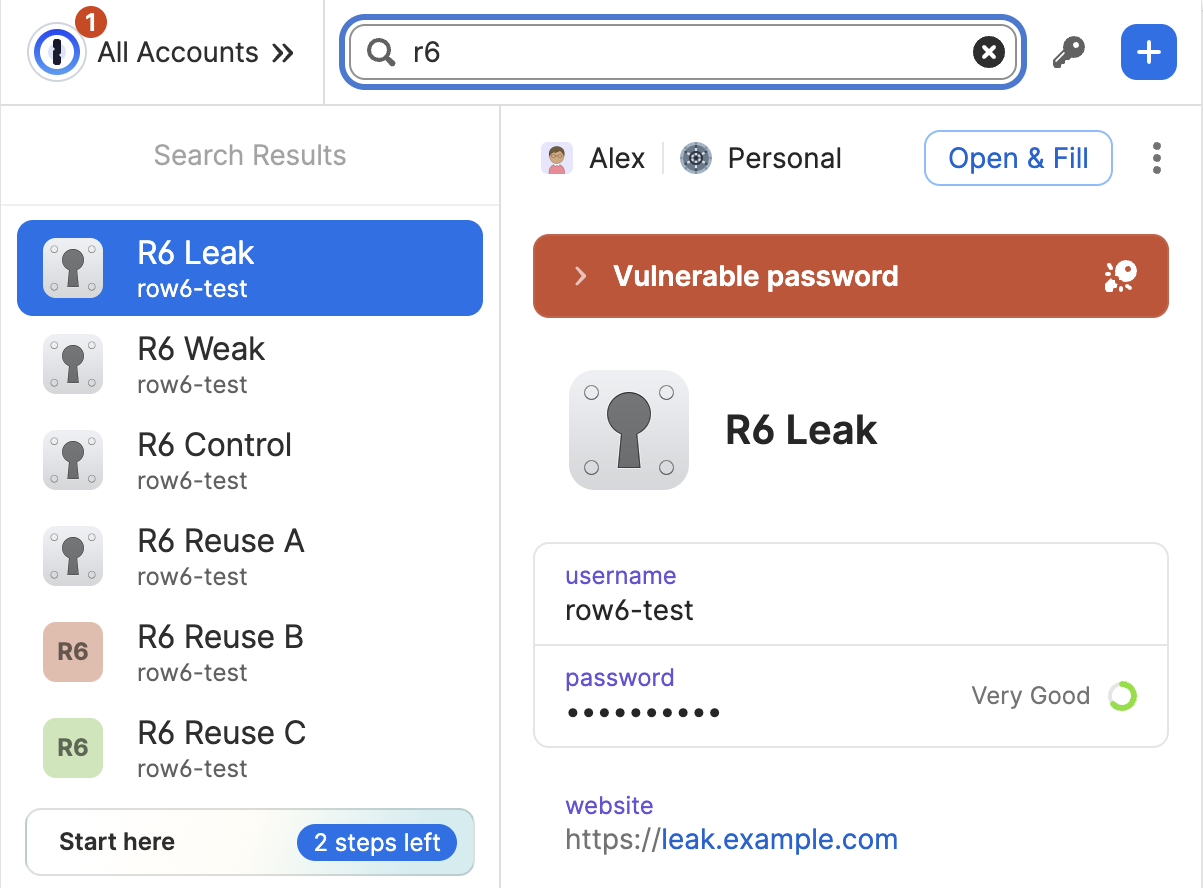
1Password didn't flag my leaked password because its leak check was switched off. The switch is called "Check for vulnerable passwords". It sits in the extension's settings under Watchtower. It was off on my account. Its own description says it will "Look up saved passwords in an online database from haveibeenpwned.com to check if they appear in security breaches." Once I switched it on, the extension showed "Vulnerable password" on the leaked login. The strength meter still said "Very Good". The web app never showed the warning. I only went looking for the switch because the leaked login showed nothing at all.
Is there a website to check data leaks regarding passwords?
Yes, Have I Been Pwned's Pwned Passwords checks a password against known leaks without sending the password itself. It reported my leaked test password 4,173 times. Bitwarden's Exposed passwords report showed the same count.
What does "found in a non-Google data breach" mean?
"Found in a non-Google data breach" means the username and password you saved turned up in breach data from a site other than Google. Google checks the two as a pair. Its help page says Chrome "encrypts your username and password" and then sends them "for comparison against an encrypted list of known breached data" (Google Chrome Help). It doesn't say the warning names the site. I didn't test Google Password Manager, so I can't tell you what its warning shows.
The checks in my test work differently. They look at the password alone. Have I Been Pwned explains that "only the first 5 characters of the SHA-1 hash are sent to the API" (Have I Been Pwned). The service never sees your password. So it can only answer "yes, this one has leaked, this many times". Bitwarden showed exactly that: "Exposed 4,173 time(s)" and nothing more. That's the price of a private check, not a fault.
- Scrambled on your deviceMy leaked test password becomes the hash
BFD3617727EAB0E8…4145 - Only 5 characters leaveThe check sends
BFD36and nothing else - A list comes backEvery leaked hash that starts with
BFD36, each with a count - Matched on your device"Seen 4,173 times". There's no site in the answer
One kind of check does name the account. It's the breached-site kind. Firefox "checks the date of a known website breach against the date you saved a password for that website" (Mozilla). That flags a specific login because the site itself had a breach. My test couldn't cover it. A login's save date can't be backdated.
Should I be worried if my password is in a data leak?
Yes, you should be worried if your leaked password is still in use anywhere. Have I Been Pwned warns that "Attackers automate login attempts using leaked credentials from other sites, exploiting password reuse habits" (Have I Been Pwned). Here's the order I'd work in.
- OursA site that was breached and that you still use. The account itself is exposed. Change it first.
- A leaked password that you reuse. Every login sharing it is open to the same attempt. Give each one its own password.
- A weak password. Change it when you can.
This order is my own reading of the risk, not a vendor rule.
Should I change my email password first?
Yes, change your email password first if it's on the list. Your email can reset most of your other accounts. Whoever controls it can get into them. Ours For the full after-breach checklist, see my breach response guide.
Do I really need to change compromised passwords?
Yes, you really need to change compromised passwords. Check the account's recovery info before you start: the recovery email, the phone number and any recovery codes. If the change goes wrong, that's how you get back in. The order that works and what broke on 28 real sites are in my guide to changing an at-risk password without getting locked out. If your manager keeps filling the old password after a change, my locked-out test covers what to do. If the alert came by email, don't follow its link. Open your password manager yourself and check the alert there.
Is there a way to change all compromised passwords at once?
No, most password managers can't change all compromised passwords at once. You change each one yourself. When I checked eleven managers, "exactly one will change a breached password for you today, and it only half does it" (my benchmark, data last verified 8 August 2026). Apple announced the same feature for its Passwords app. It was pulled shortly before iOS 27 came out in September and is now expected in a later update (Macworld, read 15 October 2026).
Flagging a password and changing it are separate jobs. Changing it is what I'm building Rekey for. It's a browser extension, in beta.
Key takeaways
- 0 of 3said where a leaked password came from. A leaked-password check can't.
- 1 of 3said why on the login, and only for a weak password (1Password).
- PremiumBitwarden flagged the leak with no setup, on its paid plan only.
- Off1Password's leak check was switched off on my account until I found it.
- ReportOpen the security report to see why. That's where reuse gets explained.
- ReuseOne shared password flags every login that uses it. Give each its own.
How this was tested
- Who and when: me, in Chrome on macOS. The test ran on 30 September 2026, with a re-check on 1 October. I ran the test on my own accounts. Claude, an AI assistant, operated the browser while I clicked the extension pop-ups. The data is what each manager showed, not an AI's answer.
- Managers: Bitwarden (Premium), 1Password (a trial account with full access) and Proton Pass (paid family plan). I read each one in its web vault. I also checked the leaked login in each Chrome extension.
- Test logins: six per manager with the username row6-test. They used example.com, example.org and example.net, which are reserved for testing. One leaked password, seen 4,173 times by Have I Been Pwned. Three logins sharing one new password, each on a different site. One weak password that hasn't leaked. One strong, unique password as the control. I checked every password against Have I Been Pwned first.
- Measured: what each login showed and which reports listed it. Whether a source was named. How reused logins were grouped. How weakness was shown. Where the reason sat.
- The 1 October re-check: on 30 September I read the reuse banners after opening logins from Watchtower and Pass Monitor. On 1 October I opened them from the main list, and neither 1Password nor Proton Pass showed them. This page uses the 1 October reading.
- Rekey: the same six logins, added by hand. On 30 September, version 0.1.10 merged test logins that shared a domain and a username. I fixed that in 0.1.11 and re-ran Rekey on 1 October. The results above are from 0.1.11.
- Not tested: the breached-website alert, because a save date can't be backdated. Google Password Manager. Free plans for 1Password and Proton Pass. Other managers.
- Help pages: every vendor quote was re-read on its live page on 15 October 2026.
- Limits: one tester, three managers, two sessions. Vendors change these screens without notice, so every result is dated. Rekey is mine.
Corrections: if a vendor changes how these alerts work or you get a different result, open an issue on Rekey's public GitHub repo. I'll re-test and date the change here.
Rekey is a browser extension, in development. Join the early-access list and we will email you once, at launch.
Get early access- Finds every exposed login by checking your saved passwords against Have I Been Pwned
- Opens each site for you, with a strong new password ready to paste
- Keeps your previous password one click away while a change isn't confirmed yet, with an undo if the update was wrong
- Open source and zero-knowledge. Passwords are encrypted on your device, and optional sync only ever stores the encrypted copy. Read the code yourself
Free while in development. We will not sell your address or send you anything else.