Rekey research · hands-on test
Changed my password and the vault kept the old one: why the save password prompt misses, and how often it did in my test
TL;DR
A password manager misses a change when the site's change page doesn't look like the form it expects. The vault then keeps the old password.
- 1Password saved all 5 changes, Bitwarden 4 and Proton Pass 2. I changed the password on five real sites on 1 and 2 October 2026.
- In all 4 misses, no prompt appeared. 11 of 15 changes saved across the three.
- Wikipedia's change page beat 3 of 4 managers. Only 1Password saved it.
- Proton Pass filled the old password after each of its 3 misses, and the site rejected it.
- Correct autocomplete labels didn't guarantee a save.
- Rekey, the extension I build, saved 4 of 5 on version 0.1.12. Read its row with that in mind.
Capture test · 1 and 2 Oct 2026 · 5 sites
4 of 15 changes got no save prompt at all
You change a password and the site says it worked. A week later your password manager fills the old one. Users have reported this on the Bitwarden, 1Password and Proton Pass forums since at least 2019, most recently on 28 September 2026. No vendor publishes how often it happens, so I measured it.
Why isn't my password manager saving my new password?
A password manager doesn't save your new password when its save password prompt never fires. The extension has to notice the change by itself, from the form and from what the page does next. When a change page doesn't match what it expects, no prompt appears and the vault keeps the old password.
The managers don't even agree on when the prompt should come:
| Manager | When it asks | In its own words |
|---|---|---|
| 1Password | Before you save on the site | "Select Update when 1Password asks you to update your login for the site." Then: "After you update your login in 1Password, select Save on the website (or the equivalent)." (1Password) |
| LastPass | After the site saves it | "Once your changes are saved, select Update on the prompt from LastPass to automatically update the stored password in your LastPass vault." (LastPass) |
| Enpass | After you submit | "A new Enpass pop-up will appear to confirm the password change." (Enpass) |
| Bitwarden | When the password you use doesn't match the vault | "Ask to update existing login" will "prompt you to update an item when used credentials don't match what is stored in Bitwarden." (Bitwarden) |
| NordPass | Usually | "In most cases, NordPass will prompt you to save the new password automatically or update an existing one if previously stored." (NordPass) |
| Proton Pass | Not stated | It saves "when you update the password or username on a website." (Proton) |
| Dashlane | Not stated | "we automatically ask if you want to update the login in your Dashlane vault" (Dashlane) |
| Keeper | Not documented | No help page I found covers updating an existing login after a change. |
Two admit it can fail. NordPass says "If you do not receive the autosave notification, create a new item and save the new password manually." 1Password links "Get help if 1Password doesn't ask you to update your login." (1Password) In my test, 1Password's prompt never came before submit, despite its own order.
If Chrome's own manager runs next to your extension, 1Password says to turn it off "so it doesn't interfere" (1Password). I didn't test Chrome's manager.
Which password managers saved the change?
1Password saved the most changes in my test: all five. Bitwarden missed one, Proton Pass missed three and Rekey 0.1.12 missed one. "Saved" means one vault item held the new password, the site accepted it, and I did nothing by hand beyond the prompt's default button.
| Site | Bitwarden | 1Password | Proton Pass | Rekey 0.1.12 (mine, beta) |
|---|---|---|---|---|
| CodebergSettings page reloads | Saved | Saved | MissedNo prompt | Saved |
| Hacker News | Saved | Saved | Saved | Saved |
| TodoistForces a re-sign-in | Saved | Saved | Saved | Saved |
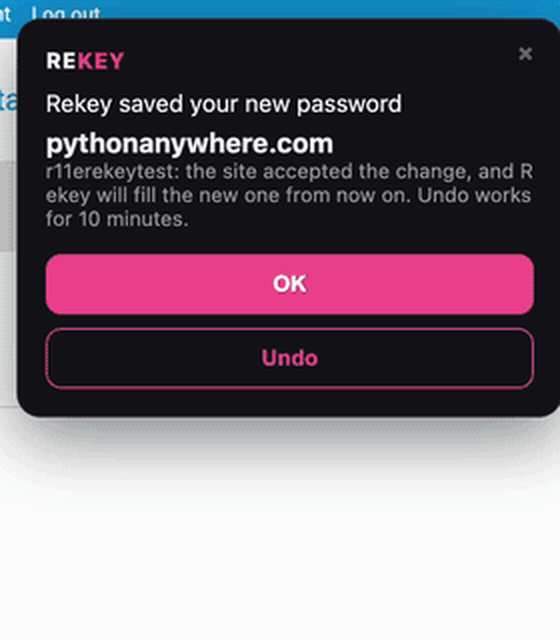
| WikipediaVerify first, then New and Retype only | MissedNo prompt | Saved | MissedNo prompt | MissedSaved as a second login |
| PythonAnywhereSettings page reloads | Saved | Saved | MissedNo prompt | Saved |
| Total | 4 of 5 | 5 of 5 | 2 of 5 | 4 of 5 |
Bitwarden on Premium, 1Password on a trial, Proton Pass on a paid family plan. I changed Rekey during the study (see How this was tested).
Download all 20 runs as a spreadsheet
Every run, with the prompt's wording and timing, the clicks to save and the next sign-in. No password values.
Hacker News and Todoist were the only sites all four saved. The misses clustered on two kinds of page. One is a change form with only New and Retype boxes, like Wikipedia's. The other is a settings page that reloads after you submit, like Codeberg's and PythonAnywhere's.
Do autocomplete attributes make the save prompt reliable?
Autocomplete attributes don't make the save prompt reliable on their own. In my test, a site that labelled every box correctly still had a miss. The one site with no labels at all was saved by three of four managers.
An autocomplete attribute is a label on a form box that says what it's for. The HTML standard defines "current-password" and "new-password", the second for "when creating an account or changing a password" (HTML Standard).
| Site | Labels on the change form | Bitwarden | 1Password | Proton Pass | Rekey 0.1.12 |
|---|---|---|---|---|---|
| Hacker News | All labelledusername, current-password, new-password | Saved | Saved | Saved | Saved |
| Todoist | Partly"off" on the current box, new-password on both new boxes | Saved | Saved | Saved | Saved |
| Codeberg | All labelledcurrent-password, new-password, new-password | Saved | Saved | Missed | Saved |
| PythonAnywhere | NoneNo label on any box | Saved | Saved | Missed | Saved |
| Wikipedia | Not recordedThe verify box was current-password | Missed | Saved | Missed | MissedSecond login |
Codeberg labelled every box correctly and Proton Pass still missed it. PythonAnywhere labelled nothing and the other three saved it. Five sites can't prove cause, but the labels weren't the deciding factor here. They say what a box is for, not whether the change worked. Chromium's guide says "Password managers need some indication that a form has been submitted" (Chromium).
Ours Site builders should add the labels anyway. Everyone else should check the vault after a change.
Why is my Bitwarden password not working?
A Bitwarden password that stops working after a change usually means the vault still holds the old one. Bitwarden saved 4 of my 5 changes. On Wikipedia no prompt appeared and the vault kept the old password.
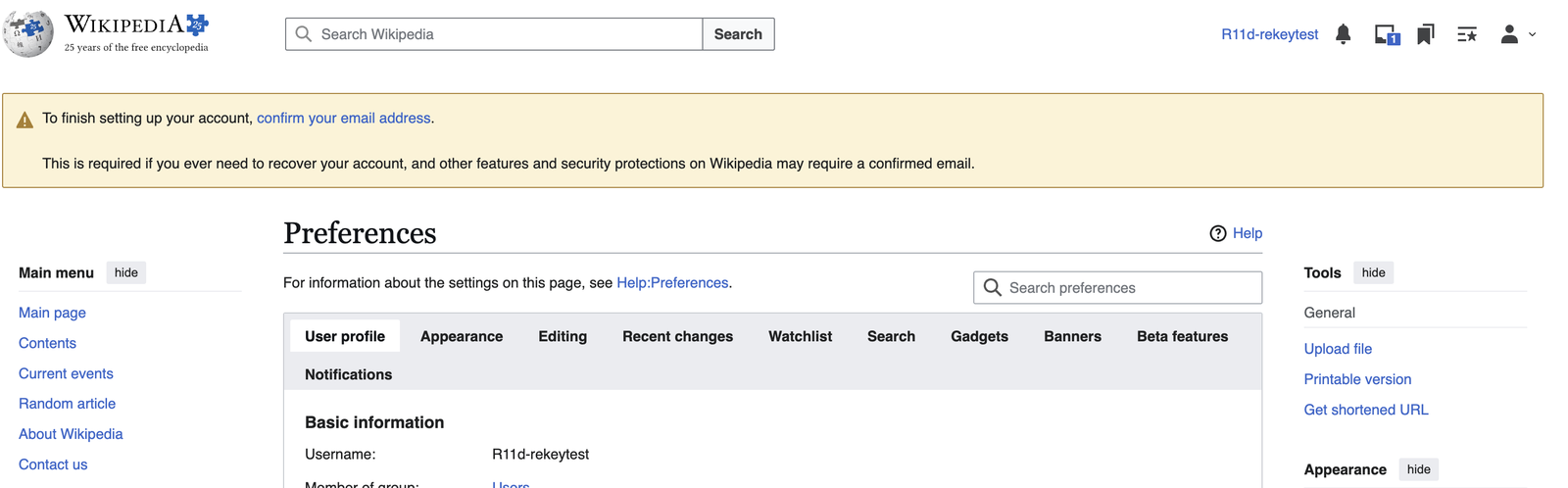
The setting meant to catch this is "Ask to update existing login", under Notifications. It didn't fire when I signed in to Wikipedia with the new password. In my locked-out test on TypeRacer, Bitwarden did offer the update. That's one case each, so call it hit or miss. Bitwarden's forum has a lost update from 28 September 2026, which ended in "failed to update item".
Where is the popup message to auto update password?
The popup message to update a password didn't appear at all in 4 of my 20 changes. All 4 were in managers I don't make: Bitwarden once and Proton Pass three times.
After each miss, Proton Pass filled the old password at the next sign-in and the site rejected it. On Codeberg and PythonAnywhere it then offered to update once I signed in by hand. On Wikipedia it kept the old password.
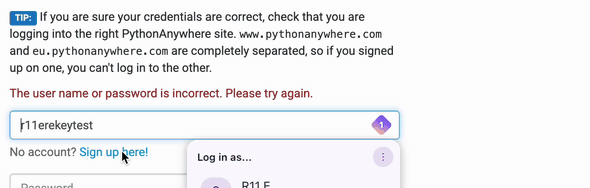
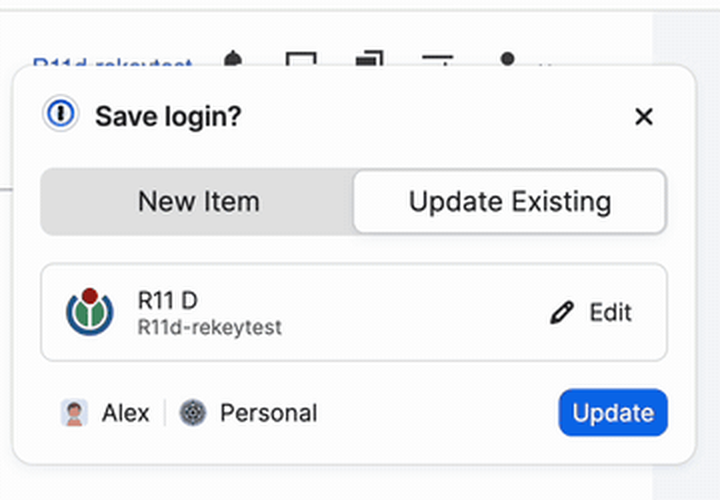
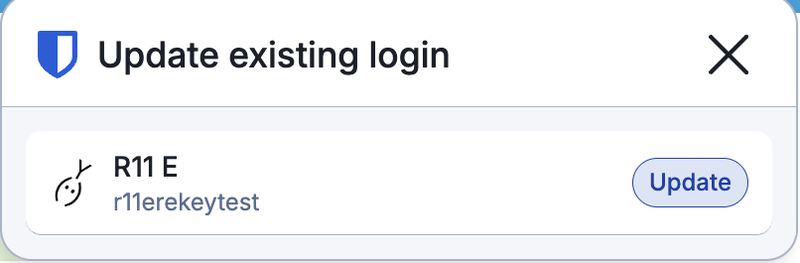
1Password was the only manager that saved Wikipedia's change. Its "Save login?" box came up as the change was submitted, with Update Existing already selected.
Why does it offer to add a new login instead of updating?
A password manager offers a new login instead of an update when it can't match the change to your saved login. Wikipedia's change form has no username box and no current-password box, so there's little to match. To you it looks like the extension is broken. Chromium asks sites to add a hidden username field to change forms (Chromium). In my test a duplicate happened once, to my own extension. Rekey 0.1.12 saved the new password as a second login with no username and left the real one on the old password.
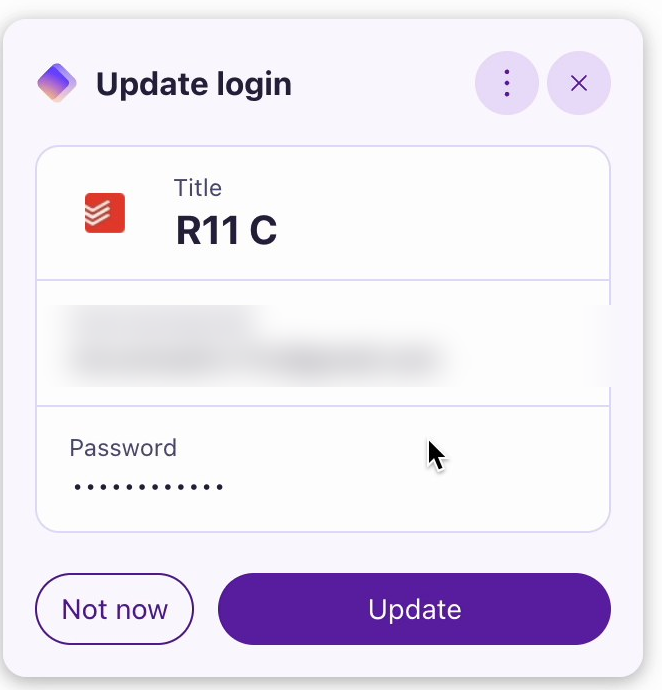
Rekey 0.1.13 fixes this. In a separate check, not counted, it updated the existing login. Its card came late, though, and it marked the change unconfirmed until the next sign-in.
In my locked-out test, 1Password's card opened on New Item after a sign-in by hand. Its help page says you "can choose the correct Login item before you save your changes" (1Password). Bitwarden's forum has a 3 June 2026 report of a duplicate made with its generator. I pasted passwords, so I didn't test generators.
Why is the new password gone after I submit the change?
A new password is gone when the page changes before the manager saves it. That didn't happen once in my test. Every prompt survived the page change, including 1Password's and Bitwarden's over Todoist's forced re-sign-in.
| Manager | When the prompt came | Clicks to save |
|---|---|---|
| Bitwarden | After submit on Hacker News, PythonAnywhere and Codeberg. Before submit on Todoist. | 1One Update button |
| 1Password | At submit on PythonAnywhere, Codeberg, Todoist and Wikipedia. On the next page on Hacker News. | 1Update Existing preset |
| Proton Pass | After submit on Hacker News and Todoist. No prompt on the other three. | 2"Update this login", then "Update" |
| Rekey 0.1.12 (mine, beta) | After submit on Codeberg, Hacker News, Todoist and PythonAnywhere. | 0Saves, then offers Undo |
Ours The order still matters. Follow 1Password's order and the vault can hold a password the site then rejects. Follow LastPass's and the vault keeps the old one if no prompt comes.
Why does it fill my old password into the new password field?
I didn't see this once where I could see the boxes. Picking the saved login filled the current-password box only. One Bitwarden run on PythonAnywhere is unconfirmed, with no screenshot. The forum complaints are over four months old.
Why does it keep asking to save a password it already has?
A prompt that fires when nothing changed is the opposite failure, and the more current one. Bitwarden users have reported update prompts after typing a two-factor code (27 June, 30 September) and on every sign-in (9 October).
In my test, Bitwarden showed no prompt on 5 plain sign-ins and 1Password none on 3. My own extension did worse. On Wikipedia, Rekey 0.1.12 flagged a correct password as rejected. Then it said it had updated a password that hadn't changed. Rekey 0.1.13 fixes both.
Don't fix it by excluding the site. In Bitwarden that stops every prompt there: it "won't issue any of the available notifications, including to save a new login, update an existing login, or to save or use a passkey" (Bitwarden). If two prompts appear at once, turn off the browser's own password manager first.
How do I check my password manager saved the new password?
To check your password manager saved the new password, open the vault before you leave the change page. That would have caught every miss in my test.
- OursCopy the new password before you submit.
- Click the prompt's update button if one appears. It's one click in Bitwarden and 1Password, and two in Proton Pass.
- Open the login in the vault. If the password or its last-edited time hasn't changed, paste the new one in yourself.
- Sign out and back in with the manager's fill. If the site rejects it, fix the vault now.
- Watch two kinds of page. New and Retype boxes only, and settings pages that reload. Every miss was on one of those.
My guide to changing a password without getting locked out says to save the new password in the vault as you submit. That's the workaround for what this page measures. No setting removes it, because capturing a change is a side feature of a vault.
Making the change and recording it is the whole job of Rekey, the browser extension I'm building. It's in beta and missed one of five here too. Rekey keeps its own copy of the new password. It doesn't update Bitwarden, 1Password or Proton Pass. If you keep one of those, copy the new password into it with Rekey's Copy new password button. I didn't test the two together.
Key takeaways
- 11 of 15changes saved by the three managers. 1Password 5, Bitwarden 4, Proton Pass 2.
- 0 promptsin all 4 misses. The vault kept the old password.
- 3 of 4managers missed Wikipedia's two-step change form. Only 1Password saved it.
- Labelsdidn't decide it. A fully labelled form had a miss. A bare one was saved by three of four.
- Order1Password says update first, LastPass after. Neither helps if no prompt comes.
- CheckOpen the login and sign in once with the fill.
How this was tested
- Who and when: me, in Chrome on macOS, on 1 and 2 October 2026. The Bitwarden runs were captured as screenshots and every other run was screen-recorded.
- Managers: Bitwarden (Premium), 1Password (trial), Proton Pass (paid family plan) and Rekey 0.1.12 (mine, beta). The other extensions' versions weren't recorded.
- Each change: the login was saved first. I signed in and let the manager fill the current password. Then I pasted a new, never-used password and submitted. No generators in counted runs. Each site had a test account, and Wikipedia's sign-in and change run on auth.wikimedia.org.
- Checks: most changes were checked by the vault value or update time, then by a sign-in the site accepted. 1Password on Codeberg and Todoist rests on the last-edited time only.
- Rekey: I built 0.1.12 on 2 October, after all the Bitwarden runs and the 1Password and Proton Pass runs on four sites. I patched it during its own runs. So it had seen their results. On Codeberg it briefly offered to fill the Delete account form's password box. Nothing was filled, and I fixed it that evening. The 0.1.13 check is in the spreadsheet, not counted.
- Not tested: generators, Chrome's manager, mobile apps, sync, and Dashlane, Keeper, NordPass, LastPass and Enpass (help pages only, read 16 October 2026).
- Limits: one tester, one change per manager per site, five sites I picked. It's a measured rate for these sites and dates, not the whole market. Vendors change their extensions without notice.
Corrections: if a vendor changes how its save password prompt works or you get a different result, open an issue on Rekey's public GitHub repo. I'll re-test and date the change here.
Rekey is a browser extension, in development. Join the early-access list and we will email you once, at launch.
Get early access- Finds every exposed login by checking your saved passwords against Have I Been Pwned
- Opens each site for you, with a strong new password ready to paste
- Keeps your previous password one click away while a change isn't confirmed yet, with an undo if the update was wrong
- Open source and zero-knowledge. Passwords are encrypted on your device, and optional sync only ever stores the encrypted copy. Read the code yourself
Free while in development. We will not sell your address or send you anything else.