Rekey research · site audit
Why the change password shortcut sends you to the homepage, and how many sites actually support it
TL;DR
Your password manager sends you to the homepage because most sites never set up the change password shortcut, and without it the manager has nowhere better to send you.
- 35 of the top 500 sites point the shortcut at a password or account page. I checked the top 500 sites with a password sign-in on 31 October 2026.
- 354 have no shortcut at all, and 20 send it to their own homepage.
- Support drops further down the list. 16 of the top 100 point it at the right page, but only 8 of the last 206 do.
- Only 33 of the 500 pass the safety check Bitwarden runs first. X, Netflix and Sentry point to the right page and still fail it.
- When the check fails, Bitwarden opens the first web address saved in your login. If you saved it from the homepage, that's where you land.
- Apple, GitHub, Wikipedia, Adobe and Vimeo get it right. Each points to the right page and passes the check.
Site audit · 31 Oct 2026 · top 500 sites
35 of 500 point the shortcut at a password page
You click the change password button in your password manager and a new tab opens on the site's homepage instead of a change password page. It feels like the extension is broken, and you're not the only one who's seen it. A 1Password user ran into exactly this in a 1 February 2022 thread, where the extension opened Twitter's change password shortcut and the browser went straight back to the homepage.
That button depends on one web address that each site has to set up itself. The Website Specification finds it on 0.585% of 668,523 sites in the HTTP Archive's September 2026 sample, but that figure counts every site whether it has logins or not. I wanted to know where the shortcut actually leads on the top sites people sign in to with a password, so I checked the top 100 on 3 October 2026 and widened it to the top 500 on 31 October.
What is .well-known/change-password?
.well-known/change-password is a fixed web address a site can use to point password managers and other tools at its change password page. It comes from a W3C Working Draft that was last published on 3 June 2024, and the draft starts from a plain problem: "Sites currently lack a way to programmatically advertise where a user can change their password."
In practice a password manager asks for example.com/.well-known/change-password and the site forwards it to the real change page. The draft says servers "should redirect" with a 302, 303 or 307 code (a page with a refresh tag is allowed too), and it says the change page itself "must not" live at that address.
A second W3C draft adds a safety check on top. Before a tool trusts the shortcut it asks the site for a page that should never exist, and if the site answers OK anyway, "it's safe to conclude that the server is not configured properly."
Why does the change password button take me to the homepage?
The change password button takes you to the homepage when the site has no shortcut or the manager doesn't trust the one it has. Either way the manager falls back to some other address, and that's often the homepage.
Google says as much about Chrome's own password manager in its web.dev guide, where Chrome will "Open the website's homepage if /.well-known/change-password is not set up and Google doesn't know the fallback."
Bitwarden's public code shows exactly where it falls back. Since September 2025 its extension has asked Bitwarden's own server to look up the shortcut, and the server runs both W3C checks. If either one fails, the extension opens "the first URL" saved in your login. The lookup also only runs when the setting that shows website icons is on, so if you've turned that off, Bitwarden always opens that first address.
The user in that 1Password thread traced their bug to the same safety check. They found that twitter.com answered OK to the page that should never exist, while GitHub answered "not found" and the button worked there. A 1Password employee replied that the check comes from the W3C reliability draft. When I checked x.com on 3 October 2026 and again on 31 October, it was still answering OK to that page. I didn't test 1Password's extension, though, so I can't say what it does today.
X, 3 October 2026. The shortcut is right. The safety check fails.
- 1x.com/.well-known/change-password
- 2302 to /settings/password
- !Page that should not exist: 200 OK
Sites without a shortcut rarely show you an error, either. When I checked five of them in my everyday Chrome window, all five ended on a homepage or a feed. I was signed in to Google, Spotify and LinkedIn at the time but signed out of Amazon, and PayPal's page didn't make it clear whether I was signed in.
Even a shortcut that points to the right page can still miss. X's ended on the home feed when I was signed in, and Netflix's ended on its marketing homepage when I was signed out.
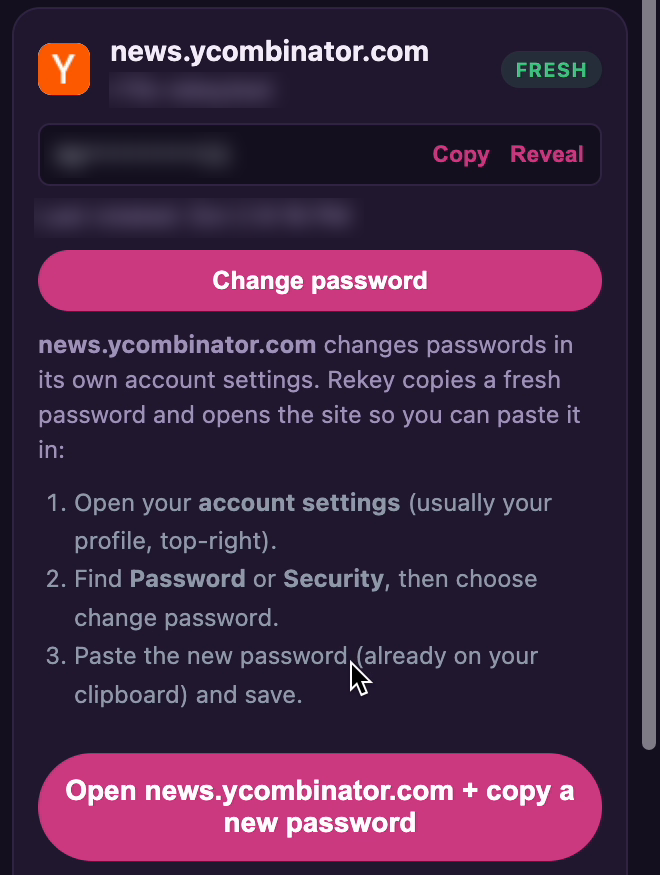
I build Rekey to help people change passwords after a breach, and it doesn't use the shortcut because so few sites support it. Instead it opens the site and copies a fresh password for you, which is what the card above shows.
Which sites support the change password shortcut?
Few sites support the change password shortcut, so the button is hit or miss. Of the top 500 sites with a password sign-in, 35 point the shortcut at a password or account page and 354 have no shortcut at all. Higher-ranked sites are more likely to have one, since 16 of the top 100 point it at the right page while only 8 of the 206 sites ranked 1001 to 1941 do.
| Result | Top 500 | Top 100 (ranks 1-334) | Next 194 (335-1000) | Last 206 (1001-1941) |
|---|---|---|---|---|
| Password or account page | 35 | 16 | 11 | 8 |
| Homepage | 20 | 6 | 9 | 5 |
| Forgot-password page | 6 | 2 | 3 | 1 |
| Sign-in page, no change target | 1 | 1 | 0 | 0 |
| No shortcut | 354 | 55 | 140 | 159 |
| Can't tell without a browser | 23 | 8 | 9 | 6 |
| Blocked my check | 48 | 9 | 17 | 22 |
| Other | 13 | 3 | 5 | 5 |
| Passes the W3C safety check | 33 | 12 | 12 | 9 |
The 500 are the first sites in Tranco list 94GG2 where people can sign up and sign in with a password, and the top 100 column is the same list as my 3 October check. "Blocked my check" means the site still blocked me in a real browser, and the safety check row counts script results only.
You can download all 500 results as a spreadsheet and reuse the data under CC BY 4.0, as long as you credit Rekey and link back to this page.
A few sites further down the list get it right too, like Bluesky, Dailymotion, TradingView and Wise, and so does 1Password's own site, which you'd hope for from a password manager. Three others came close but missed, because hltv.org, namu.wiki and cardmarket.com all point the shortcut at a change password address that just shows a 404 page when you're signed out, so I counted them as having no shortcut.
The top 100 barely moved in four weeks, with the same 16 of 100 on 3 October and on 31 October. Only two sites changed. Oracle's shortcut used to send you to its homepage and now returns a 404, while Wiley's used to block my check and now goes to its homepage.
On 3 October I also checked my own list of 50 sites, and they did worse: only 5 point to a password page and 31 have no shortcut at all.
Support has also slipped since 2020, when Google's web.dev guide named Google, GitHub, Facebook, Twitter and WordPress as sites with the shortcut. By 31 October 2026 only GitHub and WordPress still passed (both wordpress.com and wordpress.org). Google had no shortcut at all and X pointed to the right page but failed the check. Facebook sent my script to its sign-in page, so I couldn't tell where its shortcut leads.
| Result | Top 100 sites | My 50 sites |
|---|---|---|
| Password or account page | 16 | 5 |
| Homepage | 6 | 2 |
| Forgot-password page | 2 | 0 |
| Sign-in page, no change target | 1 | 2 |
| No shortcut | 53 | 31 |
| Can't tell without a browser | 9 | 9 |
| Blocked my check | 10 | 0 |
| Other | 3 | 1 |
| Passes the W3C safety check | 12 | 4 |
"Top 100" is the first 100 sites in Tranco list 94GG2 where people can sign up and sign in with a password. "My 50" are the sites from my other Rekey tests. The safety check row counts script results only, so it leaves out the sites I checked by hand.
These are the 25 top-100 sites where the shortcut went somewhere on 3 October:
| Site | The shortcut points to | Signed out, you end on | Passes the safety check |
|---|---|---|---|
| apple.com | Account pageappleid.apple.com/account/manage | appleid.apple.com/noscript | Yes |
| github.com | Security settingsgithub.com/settings/security | github.com/login | Yes |
| wikipedia.org | Change credentialsSpecial:ChangeCredentials | auth.wikimedia.org sign-in | Yes |
| netflix.com | Password pagenetflix.com/password | netflix.com/ca/login | No |
| x.com | Password pagex.com/settings/password | x.com/settings/password | No |
| wordpress.org | Password settingsprofiles.wordpress.org | login.wordpress.org | Yes |
| roblox.com | Account pageroblox.com/my/account | roblox.com/NewLogin | Yes |
| adobe.com | Security pageaccount.adobe.com/security | account.adobe.com/security | Yes |
| vimeo.com | Password settingsvimeo.com/settings/account/password | vimeo.com/log_in | Yes |
| sentry.io | Security settingssentry.io/settings/account/security/ | sentry.io/auth/login/ | No |
| wordpress.com | Security pagewordpress.com/me/security | wordpress.com/me/security | Yes |
| reddit.com | Password pagereddit.com/change_password/ | reddit.com/password/ | Yes |
| vk.com | Account pagevk.com/account/ | id.vk.ru/account | Yes |
| canva.com | Account pageSign-in, returns to /account | canva.com/login/ | Checked by hand |
| ok.ru | Password settingsok.ru/settings/password | ok.ru sign-in page | Yes |
| etsy.com | Account pageSign-in, returns to /your/account | etsy.com/ca/signin | Checked by hand |
| mail.ru | Homepage | mail.ru | No |
| hosting24.com | Homepagehostinger.com | hostinger.com | No |
| oracle.com | Homepage | oracle.com | Checked by hand |
| comcast.net | HomepageXfinity landing page | xfinity.com/national/ | Checked by hand |
| steampowered.com | Homepage | store.steampowered.com | No |
| dell.com | Homepage | dell.com/en-ca | No |
| pinterest.com | Forgot-password page | pinterest.com/password/reset/ | No |
| bbc.com | Forgot-password page | account.bbc.com/signin/forgotten | Yes |
| w3.org | Sign-in pageNo change page after it | auth.w3.org/login | Checked by hand |
"Points to" comes from the shortcut's own redirect in the hop log. For sites I checked by hand, it's the sign-in page's return target when there was one.
Download all 500 results as a spreadsheet. It lists every site with its status codes and redirect hops, along with my browser check and the Tranco filter decisions, so you can recount it all yourself. It's free to reuse under CC BY 4.0 with credit and a link. The 3 October file still has the first 150 results.
About 1 in 5 of the top 100 failed the safety check, because 20 of them answered OK to a page that shouldn't exist (one of those was a CAPTCHA page). Across the whole top 500 it was 56 sites, a little over 1 in 10. That's why X, Netflix and Sentry get thrown out. Each one says OK to everything, so a password manager can't tell their real shortcut from a made-up one.
What is an easy way to change passwords?
The easy way to change passwords on most sites is through the site's own settings, because there's no shortcut to use. Sign in, open your account menu and look for Security or Password, then save the new password in your vault as you submit it. My guide to changing a password without getting locked out covers the order that works.
How do I change a password in a password manager?
To change a password in a password manager, use the change button on the login, which in Bitwarden and 1Password relies on the shortcut. Bitwarden's help page for at-risk passwords says, "In most cases, the browser extension will take you directly to that service's change password page." That flow is only for Premium users and organization members. In my audit just 12 of the top 100 sites and 33 of the top 500 passed the check Bitwarden's server runs, and for the rest the button opens whatever address you saved.
Google Password Manager uses the shortcut too. Its guide for site owners says it also helps Chrome's automated password change, a feature that covers desktop users in the US (Chrome for Developers).
Either way you still change the password on the site yourself, and then the manager has to notice the new one. That step misses too, as I found in my save password prompt test.
How do I add a change password URL to my site?
Adding a change password URL to your site takes three checks:
- Redirect /.well-known/change-password to your real change page with a 302, 303 or 307. Don't serve the change page at that address. Google's guide says to "avoid using 301" in case the page moves. When I checked on 3 October, 7 of the 14 password-page sites my script could check used a 301, Apple and GitHub included.
- Return a real 404 for pages that don't exist. If a made-up address under /.well-known/ answers 200, password managers will ignore your shortcut. Opening the shortcut in a browser won't catch this, because X's looks fine there when you're signed out and still fails. 56 of the top 500 sites failed this, including Netflix and X, whose shortcuts are otherwise right.
- Test it signed in and signed out. Sending signed-out visitors to sign in first is fine, and Google's guide allows it, but signed-in visitors should land on the change form rather than your homepage. X's shortcut passed the signed-out test and still ended on the home feed when I was signed in.
Key takeaways
- 35 of 500top sites point the shortcut at a password or account page. 354 have none.
- 16 vs 8the top 100 do far better than the bottom of the list. 16 of the top 100 point it right, against 8 of the last 206.
- 33 of 500pass the safety check Bitwarden's server runs. X, Netflix and Sentry point right and still fail.
- FallbackBitwarden opens the first address saved in your login. Often that's the homepage.
- 2022A 1Password user traced the homepage bug to the same check. X still failed it on 31 October 2026.
- 2 of 5sites in Google's 2020 example list still pass. Google itself has no shortcut now.
How this was checked
- When: the checks ran twice, first on the top 100 and my 50 sites on 3 October 2026 (23:20 to 23:24 UTC), then on the top 500 on 31 October 2026 (23:18 to 23:35 UTC).
- Sites: three lists, each frozen before its run. The top 500 are the first 500 sites in Tranco list 94GG2 where people can sign up and sign in with a password, which goes down to rank 1941. The top 100 are the first 100 of those, down to rank 334. I approved every keep or drop call before its run and left out adult sites and piracy or illegal betting sites. Below rank 334, where it wasn't clear a site had a public sign-in, a script checked for a sign-in link or a password box and sites without one stayed out. My 50 are the sites from my other Rekey tests plus the 20 sites the script ships with.
- The check: a Python script sent plain GET requests and never signed in. It ran the two checks from the W3C drafts, first asking for a page that should never exist and then for /.well-known/change-password. It followed every redirect including refresh tags, but it doesn't run a page's JavaScript. Both runs sorted the results with the same written rules, which are in the spreadsheet.
- What the results mean: "Password or account page" means the redirect names a password, security, account or settings page. "No shortcut" means not found, including 404 pages sent with an OK code. "Can't tell" means an OK page with no redirect the script could follow. "Passes the safety check" means the page that should not exist returned an error and the shortcut returned OK.
- Signed out on purpose: the W3C draft defines the lookup without login cookies. Bitwarden's server also checks from its own machines.
- Blocked sites: 27 sites blocked the script on 3 October and 98 did on 31 October, so I opened each one signed out in a private Chrome window and noted where it landed. Even in a real browser, 10 and then 48 of them still blocked me or returned an error. On 3 October I confirmed a label for each site. On 31 October I labelled them myself, and 26 of my labels were then matched to the written rules using my notes. 8 script results were also corrected where the rules misread a redirect, such as a 404 page sent with an OK code, and I confirmed every one of these against my notes and screenshots. The 9 sites that never answered the script weren't checked by hand.
- Signed-in spot check: on 3 October, 9 shortcuts were opened in my everyday Chrome window just to read where each one ended, without typing or clicking anything on the sites. I was signed in to 5 of them, so treat these as examples rather than a rate.
- Bitwarden: I read the public code for its extension and server on 3 October 2026 and checked on 31 October that neither file had changed. I didn't test the Bitwarden or 1Password extensions for this page.
- Limits: this is two runs four weeks apart, by one tester on one connection in Canada. The audit tests the sites rather than what happens inside an extension, and sites change without notice.
Corrections: if your site adds the shortcut or I got a result wrong, open an issue on Rekey's public GitHub repo. I'll re-check and date the change here.
Rekey is a browser extension, in development. Join the early-access list and we will email you once, at launch.
Get early access- Finds every exposed login by checking your saved passwords against Have I Been Pwned
- Opens each site for you, with a strong new password ready to paste
- Keeps your previous password one click away while a change isn't confirmed yet, with an undo if the update was wrong
- Open source and zero-knowledge. Passwords are encrypted on your device, and optional sync only ever stores the encrypted copy. Read the code yourself
Free while in development. We will not sell your address or send you anything else.